
 Building Marketing Workflows
Most marketing teams do not have a content problem or a tools problem. They have a workflow problem.
A marketing workflow is the repeatable path a piece of work travels: from request to brief, draft, review, approval, launch and measurement. Every team has dozens of them, but very few have ever written them down.
That used to be tolerable. Work moved through email threads, spreadsheets and the memory of whoever had been there longest. But now we have AI agents that can pick up repetitive tasks. An agent cannot follow a process that only exists in people’s heads, and it will happily speed up a broken one.
The big brands getting real results from AI, such as Microsoft, Unilever and Adobe, did something less glamorous first. They mapped how work actually flows, decided where machines should act and where people must decide, and built from there. That’s what we’ll cover in this article. A June 2026 BCG survey found that 96% of CMOs say AI is driving an end-to-end transformation of marketing, but only 8% run campaigns where multiple AI agents act autonomously. The gap points to the work redesign still ahead.
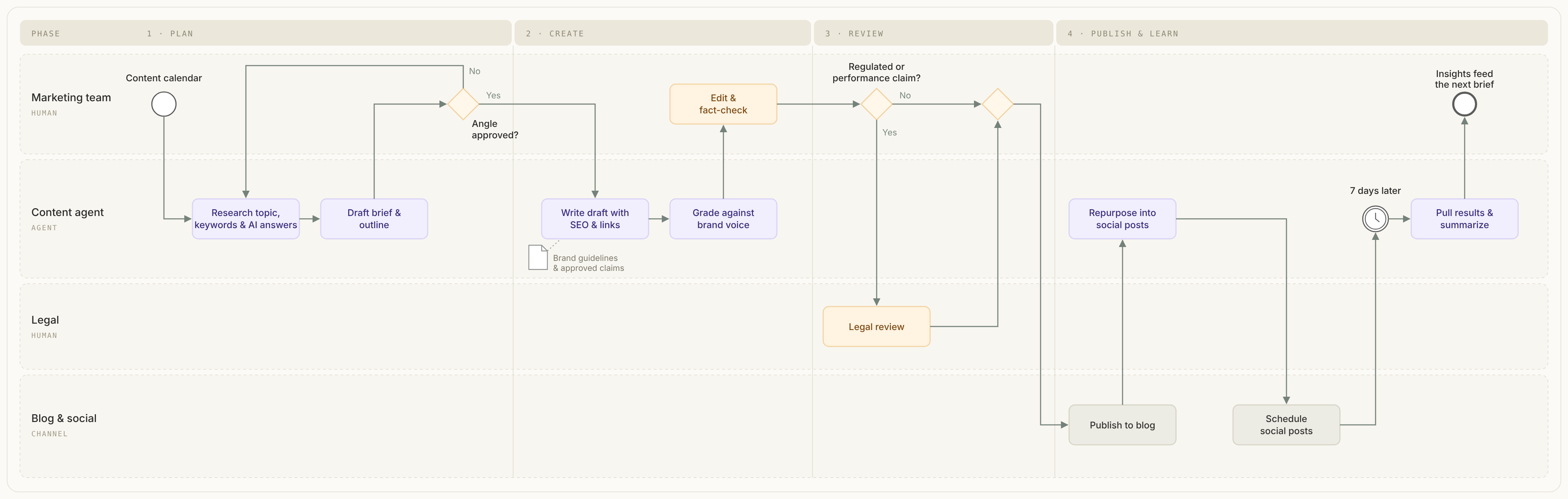
A content-generation workflow with human approvals, conditional legal review, and a learning loop.
From Campaigns to Workflows
Marketing has traditionally been organized around projects: a launch, a campaign, an event. Each one is planned, staffed and executed more or less from scratch. The process lives in a kickoff deck and a shared folder, and it is reinvented the next time.
That model made sense when output was scarce and expensive. It makes less sense when channels demand thousands of variants, launches are more frequent, and when changes can come from SEO/AEO or social alerts. Microsoft’s Azure AI marketing team faced a 40% year-over-year rise in product launches. More heroics would not have solved that. Repeatable workflows did.
Buyer behavior is changing too: G2 reports that 51% of B2B software buyers now begin research with an AI chatbot more often than with Google. Marketing workflows need to adapt to where audiences discover and evaluate products.
The old path was familiar:
- Kick off a project with a meeting.
- Assign tasks in a spreadsheet or project tool.
- Chase reviews over email and chat.
- Fix problems discovered at the last minute.
- Start over for the next project.
The workflow path is different:
- Identify the work that repeats.
- Map how it actually flows, including the exceptions.
- Decide which steps people own, which systems own, and which AI agents can take on.
- Automate the handoffs, not just the tasks.
- Measure the flow and improve it every cycle.
The shift is from managing projects to designing the system that projects run through.
See the System Inside the Task
Every recurring marketing task is a chain of smaller steps. Ask a marketer how they build the weekly performance report and you will hear three steps: check rankings, look at competitors, send a summary. Watch them do it and it is closer to eleven: export data, paste it into a sheet, compare it with last week, pull in more data, write summaries, and so on.
Profound University’s Marketing Engineering Concepts Course calls the habit of seeing those hidden steps “x-ray vision.” It matters because an agent cannot read between the lines. It does what you list, in the order you list it.
A useful picture is the early car assembly line. One craftsman building a whole car is brilliant but slow. A line gives each station one job, one input and one output, and the output of one station becomes the input of the next. Seen that way, the real question is which stations actually need a craftsman.
That leads to the central split:
| Kind of work | What it is | Who should do it |
|---|---|---|
| Lights-on (logistics) | Exporting, comparing columns, flagging a drop above a threshold, formatting and posting a summary. Needs consistency, not expertise. | An agent or automation |
| Judgment | Deciding whether a drop is a real problem, what a competitor is really doing, and whether and how to respond. Needs taste and business context. | A person, or a rule a person wrote |
Currently, roughly 80% of marketing time goes to lights-on work and 20% to judgment. The aim is not to replace the team but to make the lights-on work fade into the background so the team can spend more time on judgement.
Try it on a real task that takes at least an hour. Break it into 10 to 15 steps, noting what goes in, what comes out, and whether each step is lights-on or judgment. Fewer than five steps means you are still describing it from a distance. More than about fifteen is probably too fine.
Choose What to Automate
The list of things you could automate is endless, so the real skill is saying no. A practical filter is frequency × effort × impact.
- Frequency. Every manual run you remove pays a small dividend, so frequent work wins. Anything less frequent than weekly is a low priority to start.
- Effort. How many hours to build, how many new tools to learn, how many steps, edge cases and tests? Fascinating but rarely used work is a trap.
- Impact. How much pain does it remove, for how many people, and how close is it to leads, pipeline or sales? A dreaded quarterly task that blocks other people can still outrank an easy daily one.
Teams are measured by what their systems produce, not how many they build. IBM’s marketing team mapped its processes before automating, to avoid a sprawl of disconnected agents and runaway AI costs. The ambition-to-execution gap is common: Camunda’s 2026 report found that 73% of organizations see a significant gap between their agentic AI vision and today’s reality.
Two more things to weigh:
- New capabilities. Some of the best workflows are ones nobody asked for because nobody thought they were possible, such as a deck generator that lets people who never made slides walk into customer calls with good ones.
- Reversibility. Let it set how much autonomy an agent gets. A draft left in a doc can be agent-owned. Anything published needs human review. Anything sent to someone outside the company stays with a person.
The output of this step is a short list sorted into build first, build later and wrong target.
The Discovery Conversation
Before building anything, understand the real problem. Sometimes there is an existing process to untangle. Sometimes there is only a gap.
Start from first principles. “We spend two days a month on competitive intel and it’s always stale” invites you to speed up the report. Asking why a few times reveals the real need: leadership lacks current competitive information when it needs it. That points to live monitoring, not a faster report.
For an existing workflow, set the boundaries first: what “done” looks like, which systems are involved, where the data lives, how quality is judged and where the person thinks automation fits. Then draw out the real process. People compress steps until they disappear, so:
- Anchor to the last time. Ask “take me back to the last time you did this,” not “how do you do this?” A description gives a clean summary; a memory gives the messy reality.
- Stay quiet. The throwaway “oh, and I also check…” comments are often essential steps.
- Unpack every verb. “Review” or “compare” hides several operations. Ask what it actually looks like.
- Probe three gaps. What do you open before the work starts, what do you do after it’s done, and when has it gone wrong? Every failure story is an unwritten requirement.
- Make two passes. Map the big chunks first, then go deep on each.
For gaps with no process, look for data nobody uses, oversight nobody does, and things people assume are impossible. Be wary of enthusiasm: to change habits, a new workflow has to be far better and easier to adopt than what it replaces. The winner is often a quiet extension of work people already do, and a fix for one team often fits several.
One mindset trick: before the conversation, write down what you think the problem is and three ways you might be wrong.
Design Before You Build: Five Building Blocks
Every step in a marketing workflow fits one of five building blocks. Each one also has a natural home in BPMN, the notation covered in the next section. As Anthropic explains in its guide to building effective agents, a fixed workflow is often a better fit than a free-running agent when the steps are predictable.
| Block | What it does | Marketing example | In BPMN |
|---|---|---|---|
| Retrieval | Pulls data you already own | Search visibility metrics, CRM records | Service task reading a data store |
| Research | Fetches new outside information | Scraping competitor pricing pages | Service task |
| Reasoning | AI thinking: summarize, score, classify, draft | Write a one-paragraph brief | Service task (AI) |
| Logic | Branches on what reasoning found | Continue only if a change passes a threshold | Exclusive gateway |
| Delivery | Sends output where it is useful | Slack, email, a sheet or a doc | Send task, then end event |
Design delivery first: where does the output need to end up, who needs it and in what format? That shapes everything upstream. Then work backwards to the steps and confirm you can reach the data each one needs.
Scope a first workflow tightly: one job, one output, one cadence. A goal like “stay on top of competitors” usually hides several jobs. Each should become its own workflow, chained together later.
BPMN: A Shared Language for Marketing Work
Once you have discovered a workflow, you need a way to write it down that is precise enough for engineers and readable enough for marketers. That is what BPMN is for.
BPMN stands for Business Process Model and Notation. It is an open standard maintained by the Object Management Group (OMG), and BPMN 2.0 is also an ISO standard. It has been used for years in banking, insurance and operations. Marketing has mostly ignored it, which is a missed opportunity. To try it in a browser, use the free bpmn.io modeler.
BPMN matters now for three reasons. It forces precision: every decision point and handoff has to be drawn, so hidden steps surface. It is readable by everyone: a marketer, a lawyer and an engineer can look at the same diagram and agree on what happens. And it can be executed: it exports as XML so can be fed to any AI system involved in the workflow. For one example, Camunda’s AI agent documentation shows agents running inside BPMN workflows.
You do not need to learn the whole standard. A handful of elements covers most marketing work:
| BPMN element | What it means | Marketing example |
|---|---|---|
| Start event (thin circle) | What triggers the workflow | A product launch is scheduled; a content request is submitted |
| End event (thick circle) | How the workflow finishes | Assets published; campaign closed |
| Task (rounded rectangle) | A unit of work | Write the brief; resize creative; publish to social |
| User task | Work a person must do | Brand manager approves copy |
| Service task | Work a system or AI does | AI drafts five headline variants; CMS publishes the page |
| Exclusive gateway (diamond with X) | One path is chosen | Does the copy include a regulated claim? Yes goes to legal, no skips it |
| Parallel gateway (diamond with +) | Paths run at the same time | Localization, design and paid setup start together |
| Pool and lanes | Who owns which steps | Lanes for Product Marketing, Creative, Legal, AI agents, Web team |
| Message flow (dashed arrow) | Communication across organizations | Brief sent to an outside agency; approval returned |
| Timer event (clock) | Waiting for time to pass | Send the follow-up email three days later; escalate after 48 hours |
| Data object (page icon) | Information a step uses or creates | Brand guidelines, the approved claims list, the campaign brief |
Let’s take a look at how this comes together.
A Worked Example: A Competitive Monitoring Agent
Here is a complete build from the Profound course, drawn as BPMN. The goal: compare five competitor web pages with their previous versions and tell the product marketing team when something significant ships. The team had been spending hundreds of hours a year on this by hand, which made it a clear build-first candidate.
The diagram has one pool with three lanes: Agent, Knowledge Base (a simple spreadsheet) and Product Marketing. The flow reads left to right:
- Timer start event: the workflow runs on a schedule, with five competitor URLs as inputs.
- Service task (research): a code step calls a scraping service and captures each page.
- Service task (retrieval): read last run’s saved copies from the spreadsheet.
- Exclusive gateway: is there saved data? On the first run there is not, so save today’s pages and end quietly.
- Service task (reasoning): for each competitor, compare old and new and return three fields: changed (yes or no), type of change and severity.
- Service task (retrieval): write today’s pages back to the spreadsheet so the next run has a fresh baseline.
- Exclusive gateway: is any change medium or high severity? If not, end quietly.
- Service task (reasoning): draft a short Slack message covering only the significant changes.
- Send task (delivery): post it to the product marketing channel.
- End event: the team reviews the alert and decides how to respond.
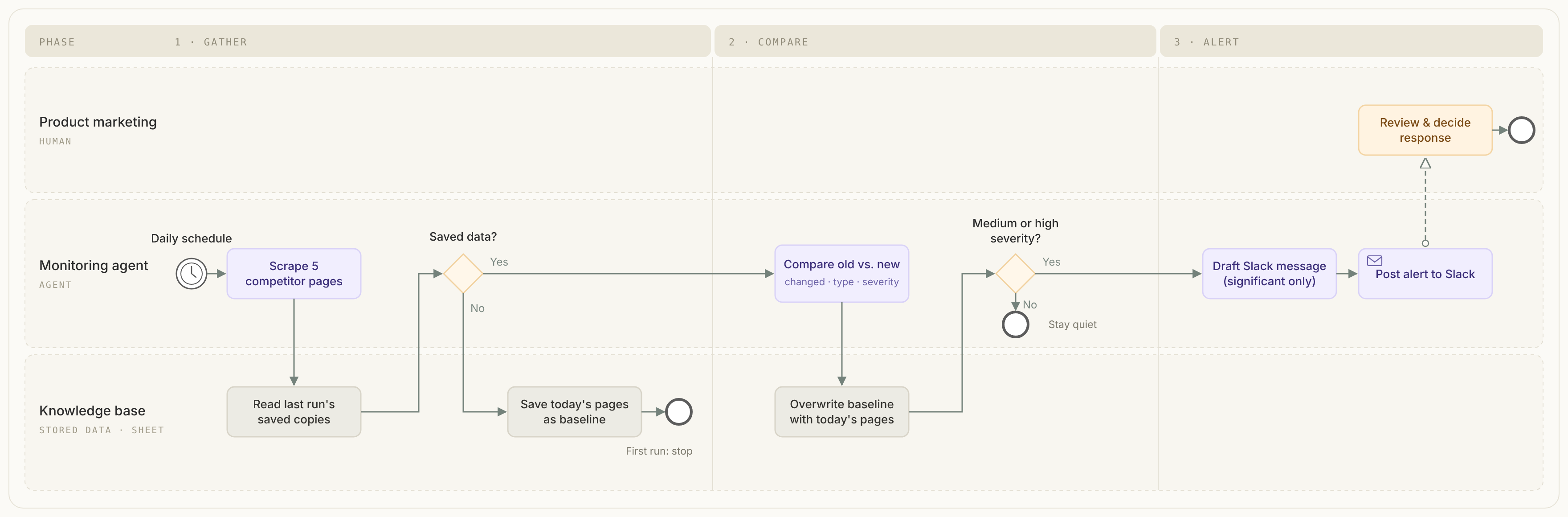
Two lessons stand out. The quiet paths matter as much as the loud one: the agent only speaks when something deserves attention. And the old weekly or monthly cadence existed only because of human limits. Once automated, the check can run daily or even hourly.
Rules, Data and Memory
A diagram shows the shape of a workflow. Four other things decide whether it actually works.
Rules. Every step that produces content needs the brand written down in a form it can use: voice, approved claims, banned phrases, visual standards. Mondelez’s AI content rules require human review and prohibit depictions of overconsumption and offensive stereotypes. Unilever’s 2025 annual report describes Brand DNAi, its global AI brand-governance framework. In BPMN terms, these rules are data objects attached to every task that creates or checks content.
Data. Agents are only as good as what they can read, and most of what they need already sits in tools the team uses. List every tool and dashboard you touch, then get specific: not “Search Console gives SEO data” but “keywords, positions, clicks by page and impression trends by day.” Data reaches a workflow in three ways: through an API (structured data straight from a platform), by reading a public web page, or by reading something already stored, such as brand guidelines, templates or the workflow’s own last output. Microsoft’s marketing team found that getting the right data in the right place was harder than building the agents. Salesforce’s Agentforce team learned the same lesson when its agent drew an outdated fact from an old marketing page.
Memory. Live data tells you what is there. Combined with stored data, it tells you what changed, which is usually what matters. The pattern has four steps: gather today’s data, read what was saved last time, compare the two, then overwrite the saved copy so the baseline moves forward. The storage can be as simple as a spreadsheet.
Handoffs. Most of the time lost in marketing is not spent doing work. It is spent waiting: for a review, a file, a decision. BPMN makes every handoff visible as an arrow between lanes. Good workflows shorten those arrows with clear owners, deadlines enforced by timer events and escalation paths when something stalls.
A useful test: if the person who usually handles a step is on vacation, can the workflow still run? If not, the knowledge lives in a person, not in the system.
Prompts and Outputs That Run Without You
A prompt typed into a chat gets watched and corrected. A prompt inside a workflow runs unattended, its input changes every run, and its output feeds the next step, so one mistake cascades. That calls for more structure.
Every prompt has three parts: context (the brand, the audience, the data and why it matters, like a new teammate’s first-day briefing), the instruction (the actual task) and the output (the format, length and structure the next step needs). Large tasks work better split into small, specialized prompts, such as one that summarizes what changed, one that judges significance and one that formats the message. When something breaks, you know where.
Prompts that run unattended also need:
- Constraints, such as “do not recommend” or “do not summarize what stayed the same.”
- A null case, such as returning exactly “no changes detected,” because models otherwise invent small differences to seem helpful.
- Room for uncertainty. “Ambiguous” beats a confident wrong answer.
- Real data. Never let the model rely on its memory for facts.
Structured outputs. People read paragraphs; the next step in a workflow wants labeled fields. Ask the model to fill in a form designed around what the next step needs:
| Type | Use when the next step must… | Example |
|---|---|---|
| Yes/no | choose a path | Did the page change? |
| Number | do math or compare | Score 42; change −8% |
| Label | route by category | pricing, feature, messaging |
| List | loop or count | thin content; missing headline; poor linking |
Name each piece of data by its source and contents, such as crm_first_name or scrape_competitor_pricing, so a teammate can tell what it holds without opening it.
Know when not to use AI. Think of AI steps as the chef and code steps as the prep station. Language models are unreliable at math, exhaustive filtering, ranking, deduplication and exact formatting, so give those jobs to small code steps. You do not need to write the code yourself: describe it in plain English, let an AI generate it, and check it on three or four items small enough to verify by hand.
Measure the Workflow, Not the Output
Once AI is in a workflow, output becomes cheap. Counting blog posts, assets or emails stops meaning much. What matters is whether the flow got better and whether the business result improved.
Adobe’s GenStudio pilot measured its own content workflow this way. Content creation time fell from 27 days to one, and click-through rates rose 84% quarter over quarter. Kraft Heinz’s TasteMaker case study reports that work which used to take eight weeks now takes eight hours. Both examples describe the speed of the workflow, not the volume of content.
A workflow defined in BPMN is easy to measure, because every step and handoff has a name. The most useful metrics are:
- Cycle time: how long the whole workflow takes, from start event to end event.
- Wait time: how long work sits between steps, often the largest share of cycle time.
- Rework rate: how often work loops back through a gateway for another round.
- Exception rate: how often a step needs a person to step in when it was meant to run on its own.
- Outcome: the business result the workflow serves, such as engagement, pipeline or sales.
- Cost per run: including AI usage, which can climb quietly as agents loop.
The goal is a workflow that gets faster and cheaper each cycle while the outcome holds or improves.
Four Workflows Worth Copying
The same building blocks recur in very different jobs. Each of these four examples from the Profound University course combines a trigger, live and stored data, a structured output, a gate that decides who hears what, and delivery shaped for its audience.
| Workflow | Team | Problem | How it works | Gate and delivery |
|---|---|---|---|---|
| Content visibility monitor | Content | Pages can look healthy in search while vanishing from AI answers, and the data sits in two places | Weekly run on key pages; pulls AI citation share and Search Console data in parallel; AI compares them per page | Significant shift: Monday Slack report. Otherwise a short “all pages stable” note |
| Post-event lead router | Demand gen | Every webinar attendee gets the same generic email | Attendee list plus product context; AI scores attendees as hot, warm or no-show | Hot leads: sales briefs in Slack and tiered follow-up drafts in a doc. Otherwise exit |
| Brand and competitor coverage monitor | Comms | Someone googles the brand by hand each morning | News searches over the past seven days plus stored messaging pillars; AI classifies the coverage | Negative coverage: urgent alert with a draft response brief. Otherwise a daily digest |
| Brand consistency auditor | Brand | Old messaging and product names survive on pages nobody reads | Scrape pages, strip navigation, compare against stored brand guidelines | Problems found: report in a doc, emailed to the brand manager. Otherwise silent |
Once you can see those parts, almost any recurring workflow can be broken down the same way.
A Build Checklist
Teams that build workflows well follow the same sequence every time:
- Pick the task. Score it on frequency, effort and impact; sort it into build first, build later or wrong target.
- Run discovery and break it into steps. Set boundaries, anchor to the last time and unpack every verb, then label each step lights-on or judgment, with its inputs and outputs.
- Scope it. One job, one output, one cadence. Write a cut list, confirm data access and set autonomy by reversibility: keep a person on anything published or sent outside the company.
- Design it in BPMN. Start from the delivery point, map each step to a building block, mark every human checkpoint and add the gates that decide when to alert and when to stay silent.
- Build each step right. Give math, filtering, sorting and formatting to code steps. Give every AI step a prompt with context, instruction and output, plus a structured output and a null case. Name data by source and contents.
- Test and improve. Run it empty, with no changes and with a real change, then improve one thing at a time against a written definition of good.
- Ship, then chain. Run it on schedule, check that people actually use the output, then build the next job from the cut list.
The BPMN diagram is not a one-time artifact. It is the living specification of how the work runs, and it changes whenever the workflow does.
The Strategic Shift
Building workflows changes what a marketing team is.
For decades, marketing capability meant talent: great writers, designers and strategists, managed through projects. That talent still matters more than ever. But in the agentic era, capability also means the system those people work inside: how work is triggered, routed, checked, approved and measured.
AI makes that system impossible to ignore. Agents amplify whatever process they are dropped into, so a clear, well-governed workflow gets dramatically faster, whereas a messy one fails faster and more visibly.
This is why a decades-old notation from the world of operations deserves a place in marketing. BPMN gives teams a common language to describe work precisely, decide where autonomy should stop and turn the picture of the process into the process itself.
The future of marketing will not be decided by who has the most AI tools, but rather by who designs the best workflows.